

From Tickets to Insights: Designing Multi‑Agent AI for TeamDynamix
At CALS‑OIT, we use TeamDynamix (TDX) to manage IT support requests across the college. It is an essential tool that ensures tickets are tracked, routed, and resolved efficiently. One advantage of TDX is that each resolved ticket contains a complete history of the issue and how it was addressed. Another advantage is its Knowledge Base Articles; a collection of digital documents housed within the Client Portal that are used to share information and troubleshooting steps.
However, even with a robust platform like TDX, the process from ticket creation to resolution often involves multiple manual steps. These include reviewing ticket history, searching the knowledge base, and validating details. Each of these steps is important, but together they consume valuable time for the staff who manage these tickets daily.
This led me to explore whether AI, specifically a multi‑agent architecture where specialized agents work together, could leverage institutional knowledge to answer support tickets more quickly and accurately. The aim is simple: move from tickets to insights faster, with less manual effort.
A Multi‑Agent System (MAS) Solution
In designing a multi‑agent AI for TDX, I focused on three specialized roles. Each agent handles a specific part of the ticket lifecycle. This specialization allows us to pair the right tools and models with each task, improving both accuracy and efficiency.
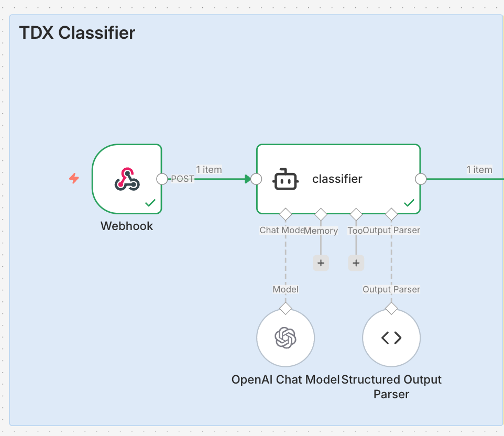
Classifier Agent
Provides a concise gist of the ticket and determines which area or topic it belongs to. This role is essential for routing tickets to the correct group promptly and reducing misclassification.
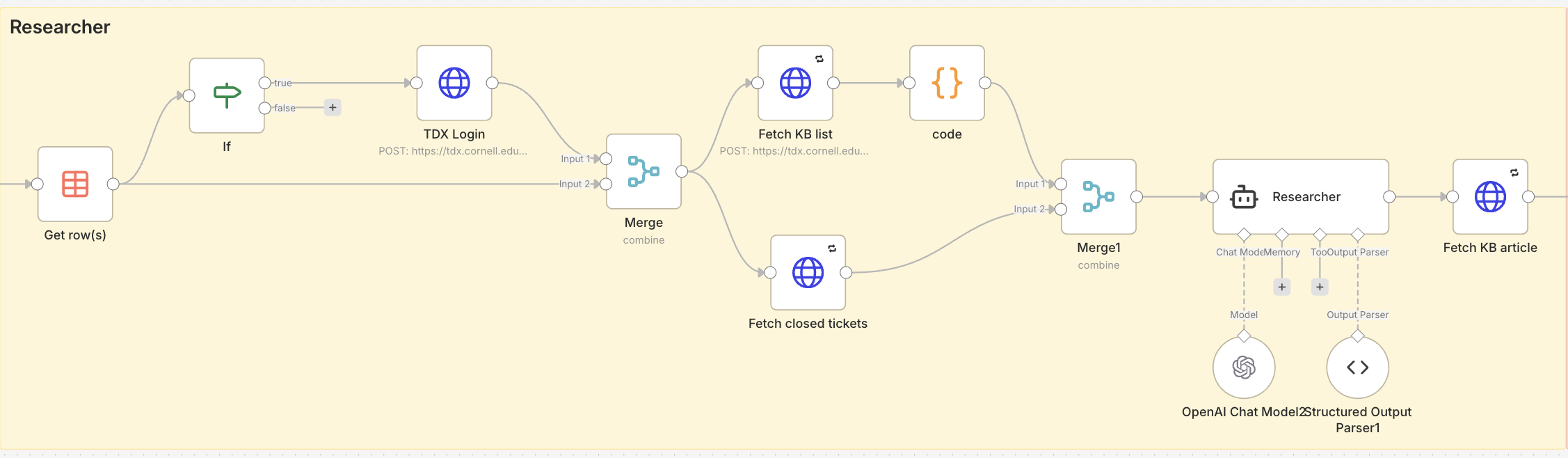
Research Agent – Search and Retrieval
Finds relevant past tickets that addressed similar issues and gathers any related Knowledge Base articles. This agent uses Retrieval‑Augmented Generation (RAG) to ensure the AI draws exclusively from trusted institutional data, preventing inaccurate or unrelated suggestions.
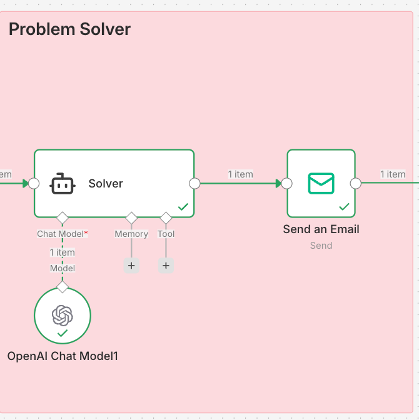
Problem‑Solving Agent – Insights and Resolution Suggestions
Suggests a possible resolution based on curated and well‑defined data sources. By grounding its analysis in structured, verified information, this agent delivers actionable solutions that reflect institutional knowledge and established practices.
Why Multi‑Agent and Why RAG
A single AI agent can be designed to handle many tasks, but in practice this can lead to inefficiencies. It must maintain context for every possible scenario, which increases complexity, cost, and the chance of inaccurate answers. By contrast, a multi‑agent system allows each agent to focus on a narrow, clearly defined role. This means we can pair each task with the most suitable language model and toolset, keeping responses accurate and consistent.
Specialization also enables cost control. For tasks like triage classification that require minimal reasoning, a smaller and faster model can be used. For deeper problem‑solving tasks, a more capable model can be called only when necessary. This targeted use of resources ensures the system remains both efficient and cost‑effective.
Working in a multi‑agent structure also reduces “context rot.” In a single‑agent design, a long conversation or oversized prompt can gradually degrade output quality as the model’s context window fills with unrelated information. In a multi‑agent system, each agent begins with fresh, task‑specific context, making it less likely that irrelevant details will interfere with results.
For research and retrieval, the system uses Retrieval‑Augmented Generation (RAG). RAG combines the power of a language model with precise data lookup, so the agent works only with verified institutional data. This approach reduces hallucinations and ensures answers remain grounded in real past tickets and knowledge base articles.
The result is an AI design that mirrors how human teams work: different specialists collaborating toward a common goal, each drawing from their own knowledge and tools, and each focusing on the part they do best.

Implementation and Results
The multi‑agent workflow was built in AI Agent Studio, a workflow automation tool within Cornell’s AI Platform, powered by N8N. The Agent Studio allowed each agent to run in its own node and communicate through defined input and output channels. This structure makes it easier to connect agents to specific tools and APIs, and to control the sequence in which tasks are performed.
To illustrate the system’s impact, consider the following example from the Agents responding to a printer installation ticket. In a typical workflow, a technician would need to read through the ticket description, manually search past cases, and locate relevant Knowledge Base articles. In the multi‑agent workflow, the Classifier Agent first identifies it as a printer issue. The Research Agent then retrieves past tickets and Knowledge Base content related to printer installation. Finally, the Problem‑Solving Agent compiles this information into a structured response that includes the proposed solution and direct references to relevant documentation.
The output (shown below) includes: A concise summary of a relevant knowledge base article about the issue and a list of similar resolved tickets. This combination gives technicians immediate, actionable information without having to navigate through multiple reports or search manually. In many cases, the response contains all the information needed to guide resolution, making it possible to address issues quickly,
Task A: Article Analysis and Solution
Article Relevance: Yes
The article “Installing Printers on Cornell Owned Computers” is directly relevant to this support ticket. The user needs help installing a newly acquired printer on a Mac, and the article provides specific instructions for this scenario.
Recommended Solution:
Based on the article content, provide the following guidance to the user:
- Verify Computer Management Status:
Determine if this is a Cornell-owned (CALS OIT managed) Mac or a personally owned Mac, as the installation process differs. - For Cornell-Owned Mac:
- CALS OIT uses PrinterLogic to manage and deploy printers
- Direct the user to CIT’s article: “Add a Printer (Mac)”
- Printers in PrinterLogic are grouped alphabetically by building name
- Naming convention: BuildingRoom#-Manufacturer-MODEL (e.g., Bradfield918-HP-CLJ3600)
- For Personally Owned Mac:
- Follow the instructions in the separate article: “Installing Printers on Personally Owned Computers” (Article ID: 844)
- If Issues Arise:
Submit a help request at help.cals.cornell.edu for direct assistance
Note: If the printer is being physically moved to a new location, CALS OIT should be involved to ensure the PrinterLogic inventory remains accurate and searchable.
Task B: Related Past Tickets
Ticket ID: 420777
Title: PrinterLogic is not installed on my Cornell-owned Mac
User needed to install PrinterLogic to access networked printer on Mac.
Ticket ID: 445492
Title: Prabhu Pingali needs help connecting to new printer in office
Mac user needed assistance connecting to a new office printer after following provided instructions.
Ticket ID: 303044
Title: Printer access for Mac
User requesting setup instructions for accessing Ricoh printers on Mac.
Ticket ID: 455490
Title: Printer set up
User needed laptop connected to multiple network printers.
Conclusion and Future Directions
The current multi‑agent design already improves how tickets are handled in TDX by speeding up triage, surfacing relevant knowledge, and proposing informed resolutions. Building it in Agent Studio has made the workflow flexible and modular, allowing agents to be refined or replaced as needed.
Looking ahead, the system can be extended in several ways. This includes integrating with external feeds, allowing technical specialists to contribute targeted information directly to specific agents to improve accuracy and relevance, and fine‑tuning models and prompts to produce outputs that are not only correct but also more helpful and meaningful for complex or uncommon cases.
As these improvements take shape, the goal remains the same: transform TDX from a ticket‑tracking platform into a knowledge‑driven assistant that enables faster, more accurate insights for the teams who rely on it every day.
AI Agent Studio is currently in a Proof of Concept phase where only approved projects have access. A transition into a Pilot phase is planned for Summer 2026.
Ido Efrati is a Programming Analyst Specialist at Cornell’s CALS Office of Information Technology, where he has spent nine years designing and architecting custom software solutions. He currently develops and maintains systems that support the college’s diverse operations while expanding into innovative AI-driven tools that enhance efficiency, support complex applications, and help users make sense of intricate data.